Activity
The activity of an application lists the deployments that you or Clever Cloud triggered: pushes, restarts, changes of scaling, and stops. Open it from the Activity menu of your application in the Console, or with Clever Tools:
clever activity
clever activity --follow --format json-stream
The Console shows the latest deployment first. clever activity shows up to the last 10 deployments, from the oldest, and --show-all removes this limit. With --follow, it adds new deployments and updates their result. --format json returns the deployments as JSON, and --format json-stream streams them with --follow.
Read an entry
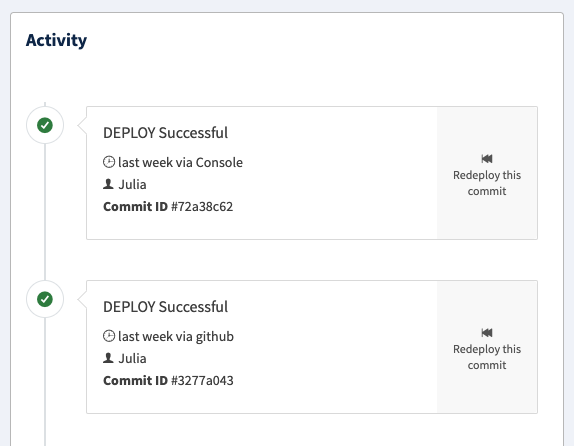
An entry shows:
- Action and state: what the deployment did, such as
DEPLOY, and its result: in progress,OK,FAIL, orCANCELLED - Date and cause: when it started, and where it came from, such as
Git,GitHub,Console, orClever Tools - Author: the member of your organisation who triggered it, when available
- Commit ID: the commit it deployed, for applications deployed with Git
- Logs: the logs of this deployment, while they’re within their retention period
From the Console, Redeploy this commit deploys the commit of an entry again, to roll back to a previous version. You can cancel a DEPLOY in progress from the Console, or with clever cancel-deploy.
Actions
| Action | Meaning |
|---|---|
CANCEL | Cancels a deployment in progress |
DEPLOY | Deploys or restarts your application |
UNDEPLOY | Stops your application |
UPSCALE | Adds instances, or increases their size |
DOWNSCALE | Removes instances, or reduces their size |
REPLACE | Replaces instances of your application |
Scaling actions follow a change of scaling you make, or autoscaling. A change you make can appear as UPSCALE even when it reduces the size: the logs of the deployment show the resulting instances.
Deployments triggered by Clever Cloud
Clever Cloud also deploys your application without any action from you: for a maintenance, when the Support assists you, or when the monitoring detects a problem. These entries usually have no author.
A maintenance deployment has Maintenance as its cause. When Clever Cloud moves your application to a new image of its runtime, with updated packages and security fixes, the cause gives both image versions, such as Maintenance/ImageUpdate/20261027/20261103.
The cause of a monitoring deployment starts with Monitoring/:
| Cause | Meaning |
|---|---|
Monitoring/Scaling | Autoscaling changes the size or the number of instances, within the ranges you set |
Monitoring/Timeout | The monitoring agent of an instance didn’t send its probes in time |
Monitoring/Unreachable | The monitoring can’t reach the agent of an instance, and redeploys your application |