













Are you having too many simultaneous connections on your PostgreSQL database? Do you dream of balancing the load of your requests across a PostgreSQL cluster? Either way, we’ve got the solution for you.
Clever Cloud is proud to introduce the native support of Pgpool-II on all application instances, for no additional fee.
See the Clever Cloud documentation on Pgpool-II.
What is Pgpool-II?
It is a middleware that comes in between your application and your PostgreSQL database (official website). As its name suggests, it pools your app’s connections to PostgreSQL, by saving and reusing them, and letting them wait when they are too many.
Pgpool-II also serves as a load balancer for PostgreSQL replicas for superior scaling. More on this below.
Pgpool-II now works out of the box on all Clever Cloud machines. Only exception: if you use docker, you’ll have to configure the Dockerfile yourself.
No more connection refused
Pgpool-II overall smoothens the use of PostgreSQL.
- Accessed on a Unix socket: faster than a TCP socket. Gotta chase those nanoseconds.
- Connection reuse: Pgpool saves connections and reuses them when similar ones come in (same user, same database…).
- Managing exceeding connections: Normally, PostgreSQL takes only so many concurrent connections, and discards any additional ones, which compromises the app. Pgpool-II, instead, queues the excess connections for later. No more
connection refused.
What do I have to do?
Barely anything. By changing only one environment variable in your code, your app will send its requests to Pgpool-II directly.
In a typical PHP app, you would connect to a PostgreSQL add-on by doing:
$host = getenv("POSTGRESQL_ADDON_HOST");
You just need to change that into:
$host = getenv("CC_PGPOOL_SOCKET_PATH");
That’s all there is to change in your code. User, password, all other calls to environment variables remain the same. See the doc for details.
Now in the Clever Cloud Console, go to your app’s environment variables, set CC_ENABLE_PGPOOL to true, and you’re good to go!
Load balancing: let’s go big
Suppose your web app is BIG. You’ve got a few INSERT queries to make (registering a new customer for instance), and a ton of SELECT queries (searches, filling pages with products, you name it). It becomes wise to create replicas of your database, a PostgreSQL feature. These identical instances, called followers, are exact copycats of your leader database. On the graph they are called primary and standby, respectively. There can be several standby nodes.
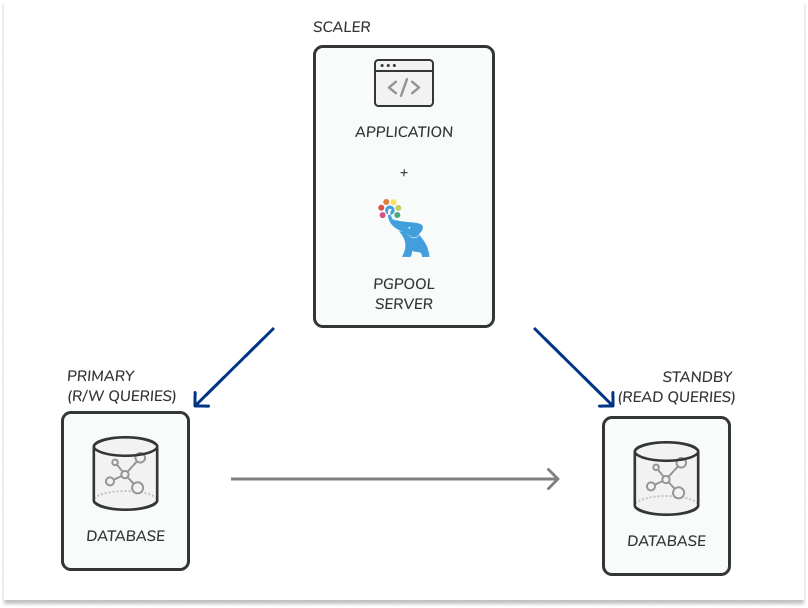
Pgpool-II will direct the write queries to the primary, and dispatch the read queries to the standby nodes, thus balancing the load and increasing throughput.
More details in the doc. All you have to do is create as many PostgreSQL add-ons as you want replicas, and ask us to do the plumbing for you.