













You use Kubernetes in your usual workflow and you wish to keep it this way all while using Clever Cloud?
We designed the Kubernetes Clever Operator for this exact purpose! You get to keep on using the tools you’re familiar with, while enjoying the performant features Clever Cloud provides, such as automatic scalability or monitoring tools.
Why a Clever Operator?
We began to work on the Clever Operator following feedbacks from some of our clients using k8s or Openshift who weren’t really satisfied about the database management solutions provided by these platforms. Then, we released this operator to answer these needs and now we are proud to announce you can even find it on Operator Hub! The Clever Operator is the best way for our customers to migrate from Kubernetes or Openshift to Clever Cloud managed solutions.
How does it work?
At Clever Cloud, we provide an HTTP API to interact with the managed services we expose. This API is located at api.clever-cloud.com. The Clever Operator works as an interface between the Kubernetes Apiserver and the Clever Cloud API. It exposes Clever Cloud’s add-ons through custom resource definition. For now, it can expose the following add-ons: PostgreSQL, Redis, MySQL, MongoDB and Pulsar.
The Clever Operator is compatible with k8s v1.21.0 or above, make sure to use one of these.
How to install it? Three steps to go:
- First, install the Clever Operator. Either build it from the source code on Github or use our docker image on Docker Hub.

- Then, configure it. It boils down to setting up
CLEVER_OPERATOR_*environment variables. For example, you need to create a token to connect to the API.
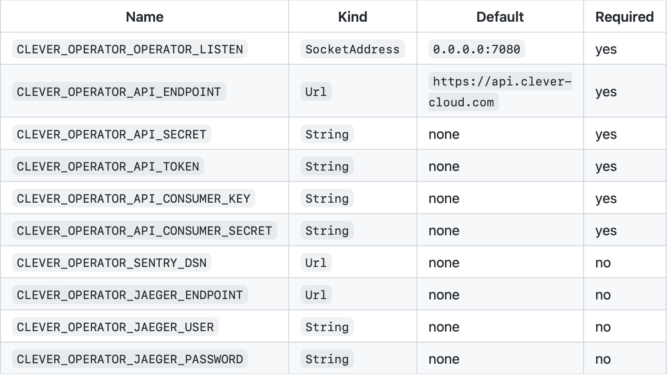
- Finally, create your custom resource definition. Here is a YAML example of what it looks like, for a PostgreSQL database:
apiVersion: api.clever-cloud.com/v1
kind: PostgreSql
metadata:
  namespace: default
  name: postgresql
spec:
  organisation: orga_xxxx
  options:
    version: 13
    encryption: false
  instance:
    region: par
    plan: s_sml
Once, the resource is created you could use the Secret created by the operator as a file directly mounted in your Pod or through environment variables. You have examples of how to do it through the examples folder or following those documentations “Using Secrets as Environment Variables” or “Using Secrets as Files from a Pod“.
Now you know how the Clever Operator works! We would be happy to have your feedback about this tool. Please feel free to create an issue here, for any suggestion of enhancement you might have.